Rescroll

AI color grading

Color grade your video by describing the look.

Type “warm and cinematic, a bit of contrast, keep my skin natural” and Rescroll's editing agent sets the grade on your own footage. Say “a touch cooler” and it adjusts. You never touch a color wheel or a slider.

Start on the free plan

The short answer

Can AI color grade a video from a text description?

Yes. In Rescroll's AI video editor you describe the look in plain English, like “warm and cinematic, a bit of contrast, keep my skin natural”, and the editing agent sets the grade on your own footage: white balance, exposure, contrast, highlights, shadows, whites, blacks and saturation. Say “a touch cooler” and it adjusts. It's on the free plan, in Chrome or Edge on a computer.

It's a real grade on your real footage, not a regenerated video: your words become the same sliders an editor would drag, so faces, motion and detail stay exactly as you filmed them, and you can always see and change the numbers. It doesn't load LUTs or apply named presets. If you already have a .cube LUT you like, the free LUT tool applies it in your browser.

Jump cuts keep one look: a grade goes to every clip cut from the same footage, unless you ask for one clip only. The rest of the edit happens in the same chat: cutting silences and bad takes, captions, zooms and text on the picture.

Four sentences, four grades

Say the look. See the grade.

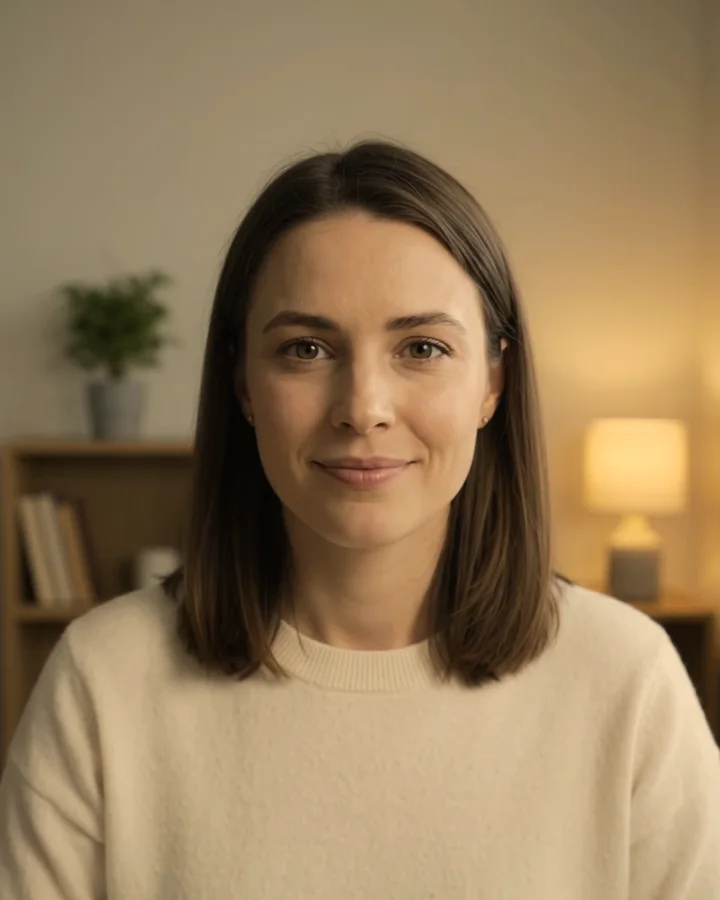
Pick a sentence. The frame is graded at exactly the slider values beside it. Drag across the picture to see the original, then give the note.

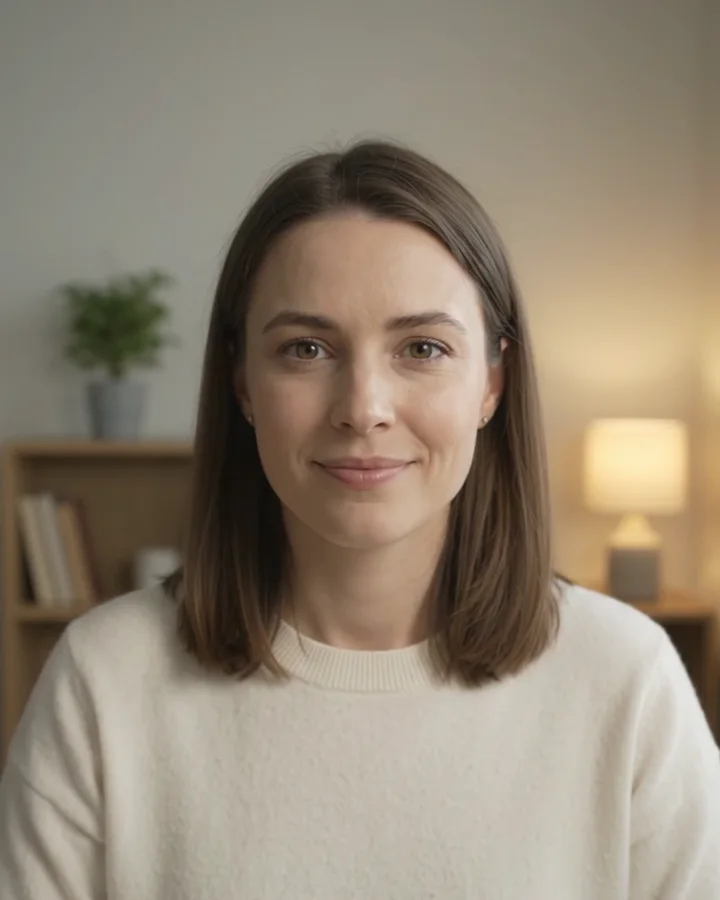
The frame graded for “Warm and cinematic, a bit of contrast, keep my skin natural.”
The same frame before the grade
⇆BeforeAfter

Warm and cinematic, a bit of contrast, keep my skin natural.

Warmer, with deeper shadows and softer highlights for a filmic feel. Skin stays natural.

Colour · set by the agent

White balance

Temperature+22
Tint+2

Light

Exposure−0.10
Contrast+34
Highlights−30
Shadows−18
Whites0
Blacks−22

Colour

Saturation+6

An example run on sample clips. Each frame is graded at exactly these values with the editor's own color maths; on your footage the agent picks values for your clip.

What a description can do

Your words, translated into a grade.

Every look is built from nine sliders. You never have to touch them: here's what each one does, and the words that move it.

The nine color sliders, what each changes, and words that move it
SliderWhat it changesSay things like
Temperature-100 to +100Warm (orange) to cool (blue). Fixes a color cast from lamps or daylight.“warmer”“cooler”“less orange”“less blue”“golden”
Tint-100 to +100Green to magenta, the other half of white balance.“less green”“less pink”“fix the fluorescent light”
Exposure-3 to +3 stopsThe whole picture brighter or darker, in stops.“brighter”“darker”“it's underexposed”
Contrast-100 to +100How far apart the darks and brights sit.“punchier”“more contrast”“softer”“flatter”
Highlights-100 to +100The bright midtones: a window, a sky, a lit face.“bring the window back”“softer highlights”
Shadows-100 to +100The dark midtones: hair, a jacket, a corner of the room.“lift the shadows”“deeper shadows”“I can't see my face”
Whites-100 to +100The very brightest point.“cleaner whites”“brighter whites”
Blacks-100 to +100The very darkest point.“deeper blacks”“a faded, matte look”
Saturation-100 to +100How strong every color is. All the way down is black and white.“more colorful”“muted”“black and white”

Pop

“Make the colors pop.”

The editor measures your footage across 24 frames (levels, exposure, white balance) and proposes slider values with a little more contrast and color. The agent looks at frames before it applies them, and every slider stays yours to change.

S-Log3 to normal color

“I shot this in S-Log3, it looks flat and grey.”

Flat, grey log footage from a Sony camera is converted to normal color (S-Gamut3.Cine or S-Gamut3), then graded like anything else.

HDR to standard color

“Why does my iPhone video look different?”

iPhones record HDR by default. HDR footage is converted to standard color automatically, so the grade you see is the grade you export.

What a sentence can't do here

  • Load a .cube LUT or apply named looks and presets. The grade is built from your words each time.
  • Change one color or one area on its own: skin only, the sky only, a teal-and-orange split. Every slider moves the whole picture.
  • Animate the grade over time. A clip has one grade.

Already have a LUT you love? Apply it free in your browser, with seven free looks to try and nothing uploaded.

Free plan and paid plans

Color grading is on the free plan.

Free

  • Color grading by description, Pop, S-Log3 and HDR conversion
  • 3 videos, up to 5 minutes each, 5 files per video
  • 20 minutes of transcription in total, for captions and cutting by words (color doesn't use it)
  • MP4 export up to 1080p, made in your browser, no watermark

Where Pro takes over

  • Exports made on our servers, at 1080p or your original size up to 4K
  • Longer videos and more of them
  • Motion graphics, voice clean-up and share links

Pro is $20 a month billed yearly, or $29 monthly. Ultimate is $55 / $79, Scale $139 / $199.

Confirm your email to get your free credits. The editor runs in Chrome or Edge on a computer.

The tools people compare

Who grades from a sentence?

Premiere, DaVinci Resolve, CapCut and Colourlab, each from its own pages, checked November 2026.

AI color grading tools compared
Automatic colorDescribe the look in wordsLUTsPriceRuns on
Adobe PremiereAuto Color (exposure and white balance), Color Match with face detectionIts AI Assistant, in public beta, can apply grading from instructionsYes$22.99/mo on the annual plan, 7-day trialWindows and macOS
DaVinci ResolveAuto color and Shot Match; AI color matching in StudioNoYesFree; Studio $295 onceMac, Windows, Linux, iPad
CapCutAI Color Correction (white balance, contrast, saturation), Color MatchNoYes (.cube, .3dl)Free online; Pro priced by regionPhone, desktop, web
Colourlab Ai 4Auto Balance and AI shot matching across a timelineThrough Claude (MCP), documented for Resolve StudioLooks from references and a look library$49/mo, $399/yr or $799 once, 14-day trialmacOS on Apple silicon, with Resolve, Premiere, Final Cut
RescrollPop (levels, exposure, white balance)Yes: the agent sets nine sliders you can see and changeNo (a free LUT tool is separate)Free plan; Pro $20/mo yearly or $29 monthlyChrome or Edge on a computer

Want masks, curves, secondaries and LUTs? Resolve is free and the deepest. Grading on your phone? CapCut. Matching dozens of shots for a client? Colourlab. A few other editors, like invideo and Daydream, also take a described look. Rescroll is for saying the look, seeing the numbers it chose, and fixing it with a note.

Sources

What to type

Say what you see. Then say what you want.

Each of these is one message in the chat on your clip. The first sets the look; the rest are notes.

“Warm and cinematic, a bit of contrast, keep my skin natural.”

A look in one sentence

Describe the feel, not the settings. The agent picks the white balance, contrast and tone, looks at frames of the result, and tells you what it changed in your words.

“A touch cooler.”

Notes, not sliders

Every change after the first is a note. Only what you mention moves, so “a touch cooler” cools it and leaves the contrast where it was.

“Make the colors pop.”

An automatic starting point

Pop measures your footage, fixes levels and white balance, and adds a little contrast and color. Then refine it in words.

“My face looks orange, fix it.”

Fix a color cast

Lamps, window light and screens tint everything. Say what looks wrong and the white balance is corrected for your clip.

“It's too dark. Brighten me up but keep the window.”

Rescue the exposure

Brighter overall, highlights held back so the window doesn't blow out, shadows lifted so your face reads.

“I shot this in S-Log3 and it looks flat and grey.”

Log footage to normal color

The S-Log3 conversion turns flat camera log into normal color first, then the grade goes on top.

Have a LUT already? Free LUT tool

How it works

How to color grade a video with AI.

From a flat, phone-gray clip to a graded MP4, without opening a color panel.

  1. 01

    Drop in your video

    An MP4 or MOV from your phone or camera, in Chrome or Edge on a computer. Vertical, horizontal or square.

  2. 02

    Describe the look

    “Warm and cinematic, keep my skin natural.” “Clean and bright for a product demo.” “Fix my orange face.” The agent sets the grade and tells you what it changed.

  3. 03

    Compare, give notes, export

    Hold Before to see the original, say “a touch cooler” or “less contrast” until it's right, then export an MP4: up to 1080p on the free plan, with no watermark.

Three ways to grade

A button, a LUT, or a sentence.

What each gives you, including where the other two are the better pick.

Auto color in an editorFilters and LUTsRescroll
Set from a sentence you typeNoNoYes
Fixes white balance and exposure for your clipYesNoYes
A look made for your footage, not a presetPartlyNoYes
Change it with a note like “a touch cooler”NoNoYes
Load your own .cube LUTYesYesNo
Change one color or area on its own (skin, sky)YesNoNo
Works on your phoneSome doYesNo

Auto color in Premiere, Resolve or CapCut is a fine start if you already edit there, and a LUT is the way to put one exact look on everything. Rescroll is for describing the look you want and refining it in words, on a computer, without learning the color panel.

Questions

AI color grading, answered.

Is the AI color grading free?

There's a free plan: color grading by description is included, on up to 3 videos (5 minutes each, 5 files per video) with 20 minutes of transcription in total, and MP4 exports up to 1080p made in your browser, with no watermark. Paid plans start at $20 a month billed yearly ($29 monthly) for exports at your original size up to 4K, motion graphics, voice clean-up and share links.

Does it add a watermark?

No. Exports on the free plan and on paid plans have no watermark, no logo and no intro or outro added. Free plan exports are MP4s up to 1080p, made in your browser.

Can I color grade my video just by describing the look?

Yes. Type the look the way you'd say it to an editor: “warm and cinematic”, “clean and bright for a product demo”, “moody, like it's late at night”. The agent sets white balance, exposure, contrast, highlights, shadows, whites, blacks and saturation for your clip, then you give notes in the same chat.

Does it work with my own footage?

Yes, that's all it works on. You drop in your own video from a phone or camera and the grade is applied to your real pixels. Nothing is regenerated, so your face, your movement and the detail stay exactly as you filmed them.

Do I need to know how to color grade?

No. You say what you want to see, and the agent turns it into slider values and checks frames of the result. If you'd like to learn, the sliders are right there in the Colour panel with the numbers it chose, and you can drag any of them yourself.

Can it fix orange or blue skin tones?

Yes, when the whole picture has the cast, which is the usual case under lamps or window light. Say “my face looks orange” and the white balance is cooled for your clip. It changes the whole picture, not skin alone: it can't isolate one color or one area.

Can I use my own LUT or a preset look?

Not in the editor. It doesn't load .cube LUTs or apply named looks; every grade is set from your description. If you already have a LUT, Rescroll's free LUT tool applies it to a video in your browser, with no upload and no watermark.

Can it make my iPhone video look cinematic?

Yes. Drop the iPhone video in on your computer and ask for the look, such as “cinematic, a bit warmer, deeper shadows”. iPhone HDR footage is converted to standard color automatically, so what you see is what you export.

What export resolution do I get?

On the free plan, an MP4 up to 1080p, made in your browser. Paid plans also export on Rescroll's servers at 1080p or your original size, up to 4K.

Can I color grade on my phone?

Not in Rescroll: the editor needs a computer: Chrome or Edge on a laptop or desktop. Film on your phone as usual, then drop the file in on your computer.

Does color grading use up my transcription minutes?

No. Color, cuts, zooms and text on the picture don't need a transcript. The free plan's 20 minutes of transcription are for captions and cutting by words: silences, filler words and bad takes.

Is this better than Premiere, DaVinci Resolve, CapCut or Colourlab?

It's different. Those give you auto color and a full color panel to work in yourself, with LUTs, masks and secondary corrections that Rescroll doesn't have; Premiere's AI Assistant (in beta) can also apply a grade from instructions. Rescroll is for describing the look, seeing the slider values it chose and refining them in words, with cuts, captions, zooms and text done the same way. The comparison on this page lists what each one does, from their own pages.

Stop scrolling.
Start posting.

Decode every Reel. Generate every visual. Post in any style you feed it. Everything you saved is one click away.

Start Your Library