Rescroll

Edit your video by describing the edit.

Silences, bad takes, captions, motion graphics, colors — a few sentences instead of hours.

Edit your first video

No editing skills needed

Vibe editing is editing a video by describing the edit instead of doing it by hand. Rescroll is an AI video editor built for it: every cut, caption, color change, zoom and motion graphic is a sentence in a chat, made on your own footage.

What you say, what you get

Say it like you’d say it to an editor. That’s the whole skill.

No timeline to learn, no effects panel, no keyframes. Each of these is one sentence in the chat on your clip — and each one used to be its own afternoon.

“Remove the silences and bad takes.”

Cuts the pauses, the ums and the restarts

Every dead second and every take you redid is found and cut. Your best read of each line stays, and the cuts land on the beat so it never looks jumpy.

Instead of
Scrubbing the whole timeline, cutting by hand, checking every cut.
“Add captions.”

Captions, timed to every word

Your video is transcribed word by word and captioned in a style that fits it — placed where they read well and stay clear of your face.

Instead of
Fixing a caption tool's typos and timing, one line at a time.

“Add motion graphics when I list the three steps.”

Motion graphics, built on your footage

Titles, lists, numbers, app screens, charts and logos — designed for the moment, placed around you and timed to the exact word you say.

Instead of
An afternoon in After Effects, or a template that looks like everyone else's.

See AI motion graphics

“Make the colors pop.”

A color grade that fits the footage

Skin tones stay natural while the dull webcam look goes: contrast, warmth and saturation set for your clip, not a one-size LUT.

Instead of
Guessing at sliders until it looks right, then matching the next clip.

“Punch in on the key lines.”

Zooms and punch-ins where they belong

A slow push on the important sentence, a cut-in on the punchline, back out for the next point. The pacing editors spend hours on, from one sentence.

Instead of
Keyframing scale on every clip and nudging each one by eye.

“Keep the pause before the punchline, and make the captions bigger.”

Then change anything, the same way

Don't like a cut? Say so. Want the captions bigger, the grade warmer, a graphic a second later? Ask in the chat and it's redone — nothing to redo by hand.

Instead of
Starting the export over because one thing was off.

Inside the editor

A real editor. You just talk to it.

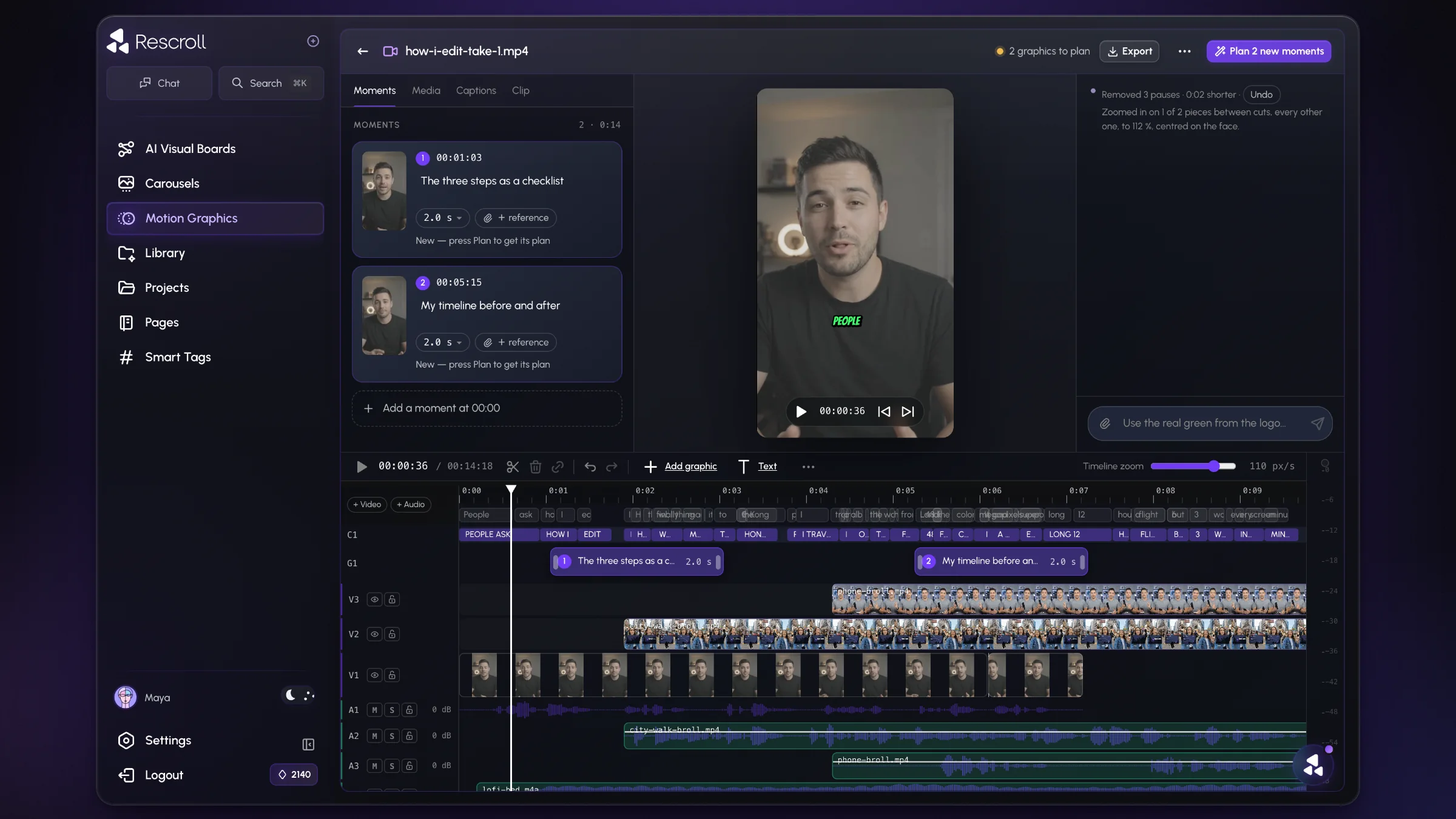
Your clip in the middle, the chat on the right, a full timeline underneath. Everything you ask for lands where you can see it.

Rescroll's AI video editor on a talking-head clip: graphics moments on the left, the clip in the middle, the chat on the right and a multi-track timeline underneath
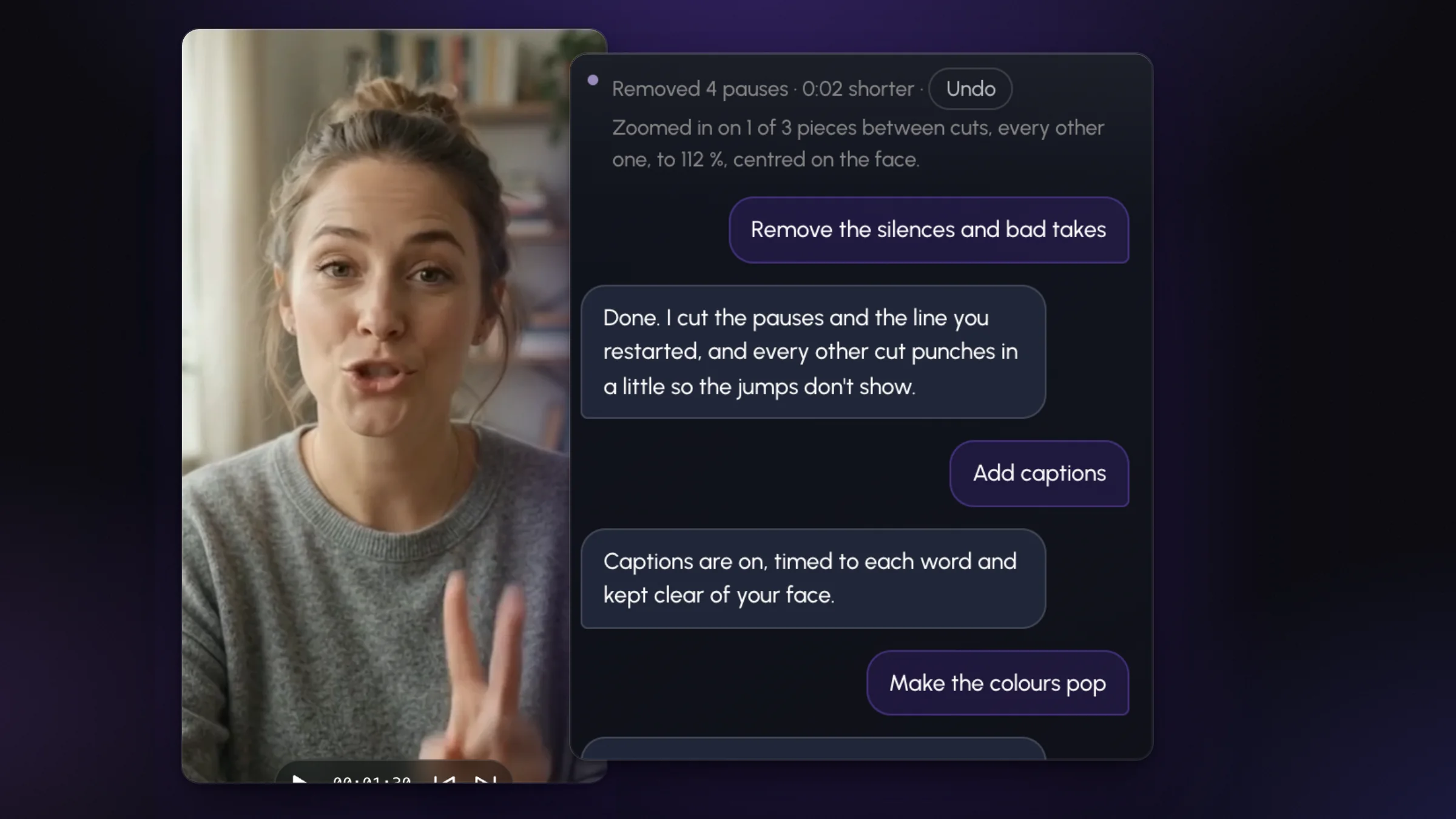
A clip and its chat in Rescroll: remove the silences and bad takes, add captions, make the colours pop — each answered with what changed

Every edit is a sentence

Ask in the chat on your clip. Each answer says exactly what changed, with Undo one tap away.

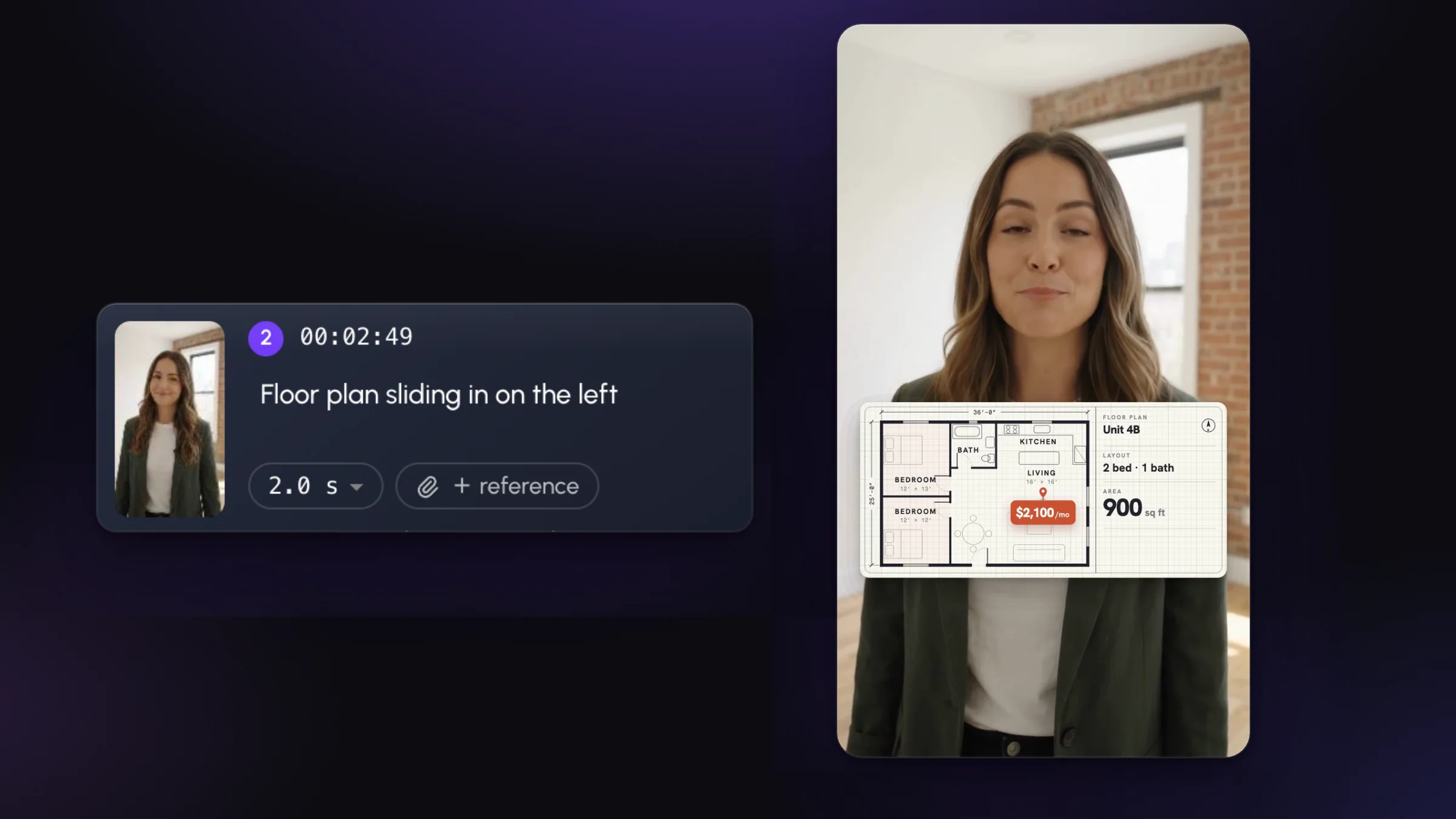
A motion graphics moment in Rescroll — “Floor plan sliding in on the left” — and the finished video with the floor plan built on the creator's footage

Premium motion graphics, built on your footage

Describe the moment in plain English. Rescroll builds the graphic around you, timed to the exact word you say.

See AI motion graphics
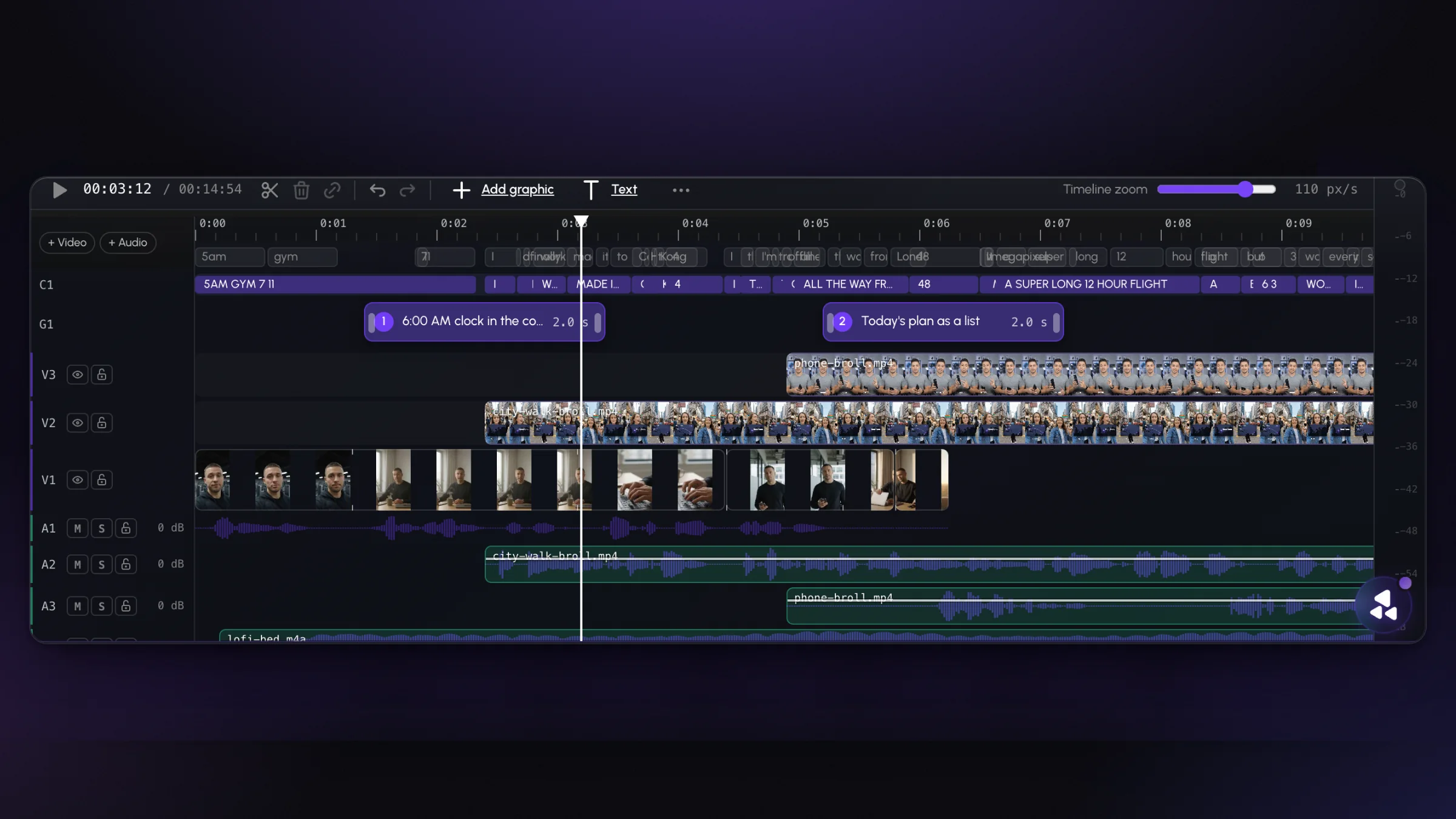
Rescroll's timeline with captions, graphics, three video lanes and audio lanes, including B-roll and a music bed

A real timeline underneath

Captions, graphics, B-roll and music each on their own lane, so you can still cut and trim by hand.

Your evening back

Film in the morning. Post before lunch.

A five-minute talking-head video is typically half a day of editing before it looks like the accounts you study. Here it’s the time it takes to type five sentences and watch the result — and the result looks like you edited it, not a template.

Edit your first video
Typical time by hand for each editing job on a five-minute talking-head video, next to what it takes in Rescroll.
The jobBy handIn Rescroll
Cut silences, ums and bad takes45–60 minOne sentence
Captions, checked and timed30–45 minOne sentence
Color grade15–30 minOne sentence
Zooms and punch-ins20–40 minOne sentence
Motion graphics2–4 hoursOne sentence per moment
A finished video4–7 hoursA few sentences

Hand times are typical figures for a five-minute talking-head video; yours depend on the footage.

How it works

Drop it in. Say it. Post it.

  1. 1

    Drop in your raw take

    Straight from your phone or camera. Vertical for TikTok, Reels and Shorts, horizontal for YouTube, square for the feed.

  2. 2

    Say what should change

    In plain English, the way you'd brief an editor: “remove the silences and bad takes, add captions, make the colors pop.”

  3. 3

    Watch it, tweak it, export

    Play the edit, ask for any change in the chat, and export a finished MP4 with your original audio, ready to post.

Nothing to install

Nothing to download

It runs in your browser, in Chrome or Edge. No app to install and nothing to update.

Start on one computer, finish on another

Your edit and the chat save as you go. Open the same video on your laptop or your desktop and pick up where you left off.

Film on your phone, edit on any computer

Shoot the way you already do, then drop the file in from whichever computer is closest.

Who it’s for

Anyone who talks to a camera and would rather not edit.

Creators

Daily TikToks, Reels and Shorts that look edited like the top 1% — without hiring an editor or learning one.

Rescroll for creators

Coaches and course makers

Record the lesson once. Cuts, captions and the key points on screen, then on to the next lesson.

Rescroll for coaches

Podcasters and YouTubers

Long 16:9 takes, tightened and captioned, with the numbers and names you mention put on screen.

See everything it does

Agencies and social media managers

Clients' raw footage in, finished videos out — in each client's look, without the editing queue.

Rescroll for agencies

Pricing

Less than an hour of an editor. A month of videos.

The AI video editor is part of Rescroll Pro and Ultimate, along with motion graphics, carousels and your whole library. Edits run on your plan’s monthly credits.

Pro

$20/mo

billed yearly · $29 monthly

2,500 credits a month

  • AI video editor
  • AI motion graphics
  • AI carousels
  • Your whole library, chat-ready

Ultimate

$55/mo

billed yearly · $79 monthly

10,000 credits a month

  • AI video editor
  • Everything in Pro
  • 4× the credits
  • For daily posting

Questions

Vibe editing, answered.

What is vibe editing?

Vibe editing is editing a video by describing the edit instead of doing it by hand. You drop in your footage and type what you want — “remove the silences and bad takes, add captions, make the colors pop” — and an AI editor makes those changes on your actual footage. The name comes from vibe coding, where you describe the program instead of writing it. Rescroll is a vibe editing tool: every edit is a sentence in a chat, and the result is a finished video you export and post.

What is an AI video editor?

An AI video editor is software that does the editing work from your instructions rather than your clicks. Older AI editors automate single jobs — a caption generator, a silence remover. Rescroll works on the whole edit: you describe what you want in plain English, and it cuts, captions, grades, zooms and adds motion graphics on your own footage, then lets you change anything by asking.

How do I edit a video with AI by just describing the edit?

Drop your video into Rescroll, open the chat on the clip and type what should change. Start broad — “remove silences and bad takes, add captions, add motion graphics where I list the steps, make the colors pop” — then play the result and refine: “keep the pause before the punchline”, “make the captions bigger”. When it looks right, export the finished MP4.

Can AI remove silences and bad takes from my video?

Yes. Rescroll transcribes your video and reads the footage, so it can find every dead pause, filler word and restarted line and cut them while keeping your best take of each line. You ask for it in one sentence: “remove the silences and bad takes.” If a cut is wrong, say which one and it's put back.

Does it add captions automatically?

Yes. Say “add captions” and your video is transcribed word by word and captioned in a style that fits the clip, placed clear of your face. You can ask for a different look — bigger, a different color, one word at a time — in the same chat.

Can it add motion graphics too?

Yes. Say what should appear and when — “put my three tips on screen as I say them”, “show the app's checkout when I say one tap” — and Rescroll designs the graphic, builds it on your footage around you, and times it to the word you say. It's the same AI motion graphics engine as the dedicated motion graphics page; attach a screenshot, logo or saved page to match a real brand.

Can it color grade my video?

Yes. Say “make the colors pop”, “warmer”, “more cinematic” or “match my last video” and it sets contrast, warmth and saturation for your footage while keeping skin tones natural. It isn't a one-size preset: the grade is set for your clip.

Can it zoom in and punch in on the important lines?

Yes. Say “punch in on the key lines” or “adjust the zoom levels so it's not static” and it adds pushes and cut-ins where the sentence calls for them, then returns for the next point — the pacing you see in top creators' talking-head videos.

Do I need any editing skills?

No. If you can describe what you want to an editor, you can use Rescroll. There's a frame-accurate timeline if you want to place something yourself, but you don't need it — everything on this page is done from the chat.

What videos does it work with?

Talking-head and screen videos in any shape: vertical 9:16 for TikTok, Reels and Shorts, horizontal 16:9 for YouTube, podcasts and course lessons, and square or 4:5 for the feed. Film on your phone or camera as usual and drop the file in.

Can I change the edit after it's made?

Yes — that's the point of editing in a chat. Ask for the change in plain English: “bring back the pause before the joke”, “make the captions bigger”, “the graphic a second later”, “a little less saturated”. The edit is redone and you play it again.

What do I get when I export?

A finished MP4 of your video with the cuts, captions, grade, zooms and graphics on it and your original audio, at your original resolution. Post it as-is, or bring it into CapCut, Premiere Pro or DaVinci Resolve if you want to keep going by hand.

What's the difference between vibe editing and an AI video generator?

An AI video generator makes new footage from a text prompt — a scene that never happened. Vibe editing works on video you shot: it edits your real footage from your description. Rescroll edits; it doesn't generate you.

Is this like Descript, CapCut or Opus Clip?

They overlap on single jobs. Descript edits by editing the transcript, CapCut is a timeline editor with presets, and Opus Clip cuts a long video into shorts. Rescroll is the whole edit from a sentence — cuts, captions, color, zooms and custom motion graphics on one video — and you refine it by asking, not by learning a tool.

How much does the AI video editor cost on Rescroll?

It's included in the Pro plan ($20/month billed yearly, or $29 monthly) and the Ultimate plan ($55/month billed yearly, or $79 monthly). Edits use your plan's monthly credits — 2,500 on Pro, 10,000 on Ultimate.

Is there a free version?

No. The AI video editor is part of Pro and Ultimate: every edit is made by frontier AI models reading your actual footage, and that work isn't free to run. The rest of Rescroll — your library, chat and carousels — comes with it.

Do I need to download or install anything?

No. Rescroll's AI video editor runs in your browser — Chrome or Edge on a laptop or desktop — so there's no app to install and nothing to update. Your edit and the chat save as you go, so you can start on one computer and finish on another.

Does it work on my phone?

Not yet — it runs in Chrome or Edge on a laptop or desktop computer. Film on your phone as usual, then drop the file in on your computer.

Your next video,
edited by the time you’ve said so.

Drop in the take. Type what should change. Watch it, tweak it, export it — no timeline, no template, no editor on retainer.

Edit your first video

Part of Pro and Ultimate · No editing skills needed