
Animated Text for Reels and TikTok: Kinetic Typography That Helps Instead of Distracting
Animated text is the first motion graphic most creators try and the one most often overdone. Used well, it's the cheapest way to make a talking-head video feel designed. Used everywhere, it's noise.
Here's how to tell the difference.
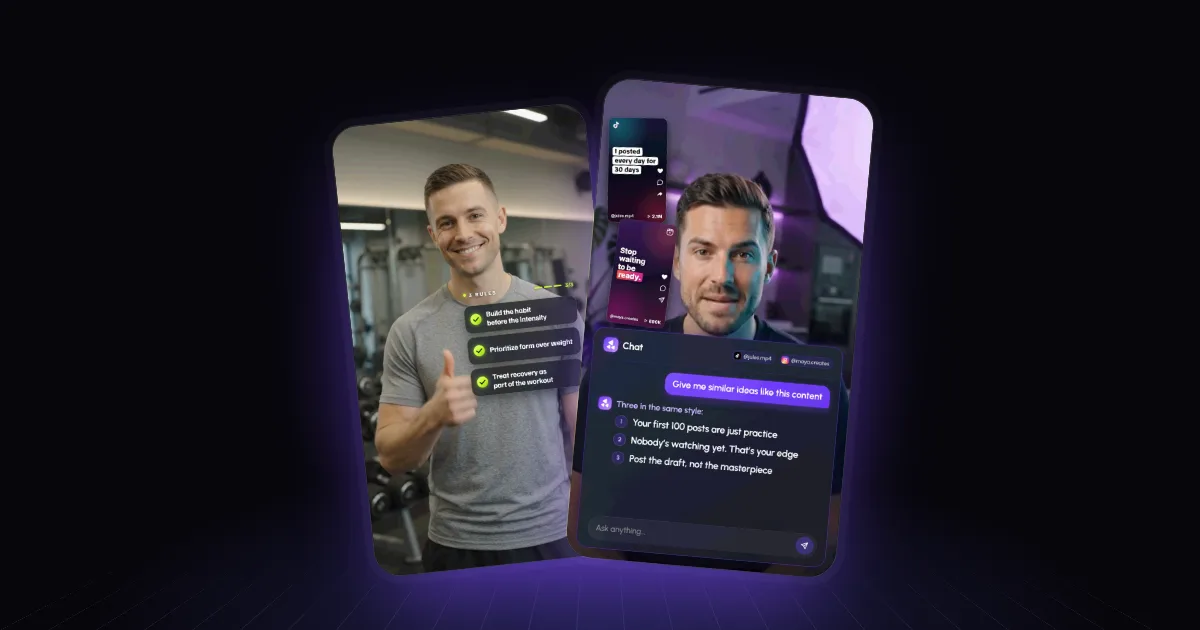
Above: three training rules build one by one beside the speaker, each checking off as he says it.
Animated text isn't captions
Captions transcribe what you say, word for word, so people can follow with the sound off. They're a utility, and on short-form video they're close to mandatory.
Animated text — kinetic typography, if you want the design term — picks out the few words that matter and turns them into a graphic: a list that builds, a phrase that punches in, a label that points at something. It's emphasis, not transcription.
Most good videos use both, in different places. Captions low and centred; animated text beside or above you. When they fight over the same spot, both lose. (More on how motion graphics differ from captions, B-roll and animation.)
What deserves animated text
- Lists. "Three rules", "five mistakes". Show each point as you say it, and keep the earlier ones on screen so the list builds.
- The key phrase. The one line you'd put on the thumbnail. Once per video, maybe twice.
- Names and labels. Who's talking, what the product is called, the name of the framework.
- Contrast. "Not this — this." Two words side by side do more than a sentence.
What doesn't: filler words, whole sentences you're already saying, and anything you're emphasising just because the screen feels empty.
Make it readable
- Big. People watch on phones at arm's length. If it's not readable in one glance, it's not readable.
- Short. Three to six words per graphic. Cut the rest.
- High contrast. Light text on a dark card, or dark on light. Text straight on busy footage needs a card, a shadow or an outline.
- On time. Appear on the word, stay while it matters, leave. Text that shows up early gives away what you're about to say.
- One style. One font, two colours, one kind of motion — for the whole video, ideally every video. It's most of what makes premium styles like Iman Gadzhi's look expensive.
Motion that helps
Pick one or two movements and reuse them: a quick slide-and-fade in, a scale-up for emphasis, a highlight that sweeps across a key word. Save anything flashier — bounces, shakes, spins — for the one moment that deserves it. If every word is doing a trick, none of them is.
How to make it
Templates in your editor. CapCut, Canva and Instagram's own editor all have preset text animations — pick one, type, place it. Fast and free, and fine for a simple pop. The limits: presets look like presets, they don't know where your face is, and timing each one to your voice is manual. Our guide to motion graphics in CapCut covers how to get the most from them.
Describe it to AI. In Rescroll AI Motion Graphics, describe the moment: "when I say 'three rules', build them as a checklist beside me, each one ticking off as I say it." Rescroll designs the text graphic for that moment, places it clear of your face, captions and app buttons, lands each line on the exact word from a word-by-word transcript, and exports the finished video. Attach your font file or a screenshot of your brand and it matches them.
One note: Rescroll builds graphics, not captions — keep using your usual caption tool for those.
Frequently asked questions
What is kinetic typography? Kinetic typography is text that moves in a way that adds meaning: a list building point by point, a key phrase punching in on the word, a number growing as you say it. It's a type of motion graphic, and different from captions, which transcribe everything you say.
What's the difference between animated text and captions? Captions put every word you say on screen so people can follow with the sound off. Animated text picks out the few words that matter — the list, the key phrase, the number — and designs them as graphics. Most good short-form videos use both, in different parts of the frame.
How do I add animated text to a Reel or TikTok? Pick the handful of words that matter, decide where each will sit clear of your face and the app buttons, and make each one appear on the word you say it. Template animations in CapCut, Canva or Instagram's editor handle simple pops; an AI motion graphics tool like Rescroll designs custom text graphics from a description and times them to your voice.
How much animated text is too much? If more than a few words per sentence are animating, it's too much. When everything moves, nothing stands out, and viewers stop reading and start ignoring.