
How to Make an Animated Travel Map Route for Your Videos
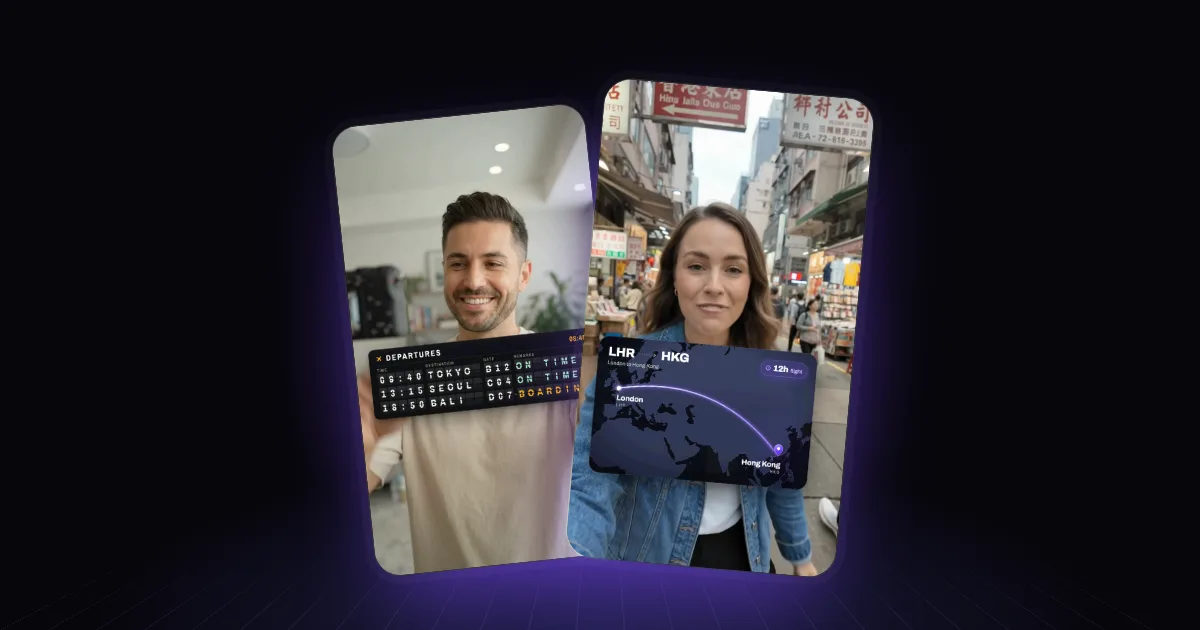
Nothing says "we're going somewhere" like a line drawing itself across a map. It's the travel creator's signature graphic, and it works just as well for a founder moving cities, a coach's world tour or a "where our customers are" moment.
Above: a creator on a street in Hong Kong. The route draws from London to Hong Kong as she names the city, with the 12-hour flight time on the card.
What makes a route animation work
One clear route. London to Hong Kong, not London to Dubai to Singapore to Hong Kong, unless the layovers are the story. Every extra stop is another thing to read.
The line draws on the word. Start drawing as you name the destination and arrive as you finish the sentence. A line that's already done before you mention the place is decoration.
Labels people can read. Short city names or airport codes, big enough to read at arm's length. A small detail on the line — the flight time, the distance, the date — adds a lot for very little.
A style that fits the video. A dark, minimal map for a cinematic travel vlog; a bright, flat one for a chatty storytime. The map shouldn't look like it came from a different video.
It stays out of the way. On vertical video, keep the map in the lower or upper third away from your face, and clear of the right edge where the app buttons sit.
Not just maps: the departures board
The same idea works as a split-flap departures board: destinations and times flipping into place as you list where you're going next. It's a nice alternative when the places matter more than the geography — a year of trips, a tour schedule, a list of cities.
Three ways to make one
A route app. TravelBoast is a free mobile app (with in-app purchases) built for exactly this, and mult.dev makes route animations in the browser, with a free tier and a one-time Pro purchase. Both give you a separate clip to add in your editor, where you'll resize it, position it and line it up with your voice.
By hand in After Effects. Full control over the map style and the line, and plenty of tutorials. Also plenty of time per video.
Describe it to AI. With Rescroll AI Motion Graphics you describe the moment on your own video: "when I say Hong Kong, draw a route from London to Hong Kong on a dark map in the lower third, with the 12-hour flight time on the line." Rescroll builds it on your footage, places it clear of you, times the line to your words from a word-by-word transcript, and exports the finished video. If you'd like the map lighter or the line slower, say so in the chat.
Want more ideas like this? 40 motion graphics prompts that actually work has a section on maps and places.
Frequently asked questions
How do I make an animated travel map for a video? Pick the start and end points, choose a map style that matches your video, and animate a line drawing from one to the other as you name the destination. Apps like mult.dev and TravelBoast make route animations you export and add in your editor; an AI motion graphics tool like Rescroll builds the route directly on your video, timed to your words.
What's a free app for animated travel routes? TravelBoast is a free mobile app with in-app purchases, and mult.dev has a free tier with a small number of videos at lower resolution and its logo on them. Both export a separate clip you then add to your video.
How long should a map animation be? Usually two to four seconds for the line to draw, plus a beat to hold on the destination. Longer routes can take longer, but on short-form video anything past five or six seconds starts to drag.