
How to Make a Text Message Animation for Reels and TikTok (That Doesn't Look Like a Template)
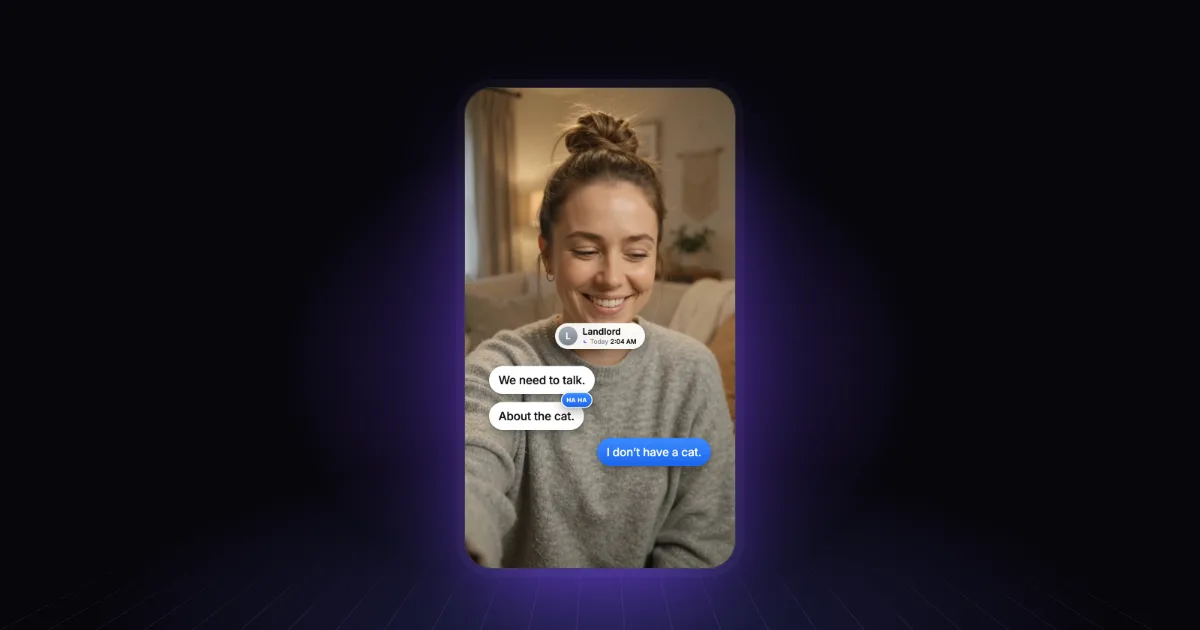
"So my landlord texts me at 2 a.m...." is a great opening line. It's an even better one when the text appears.
Text message animations are the single most useful graphic for storytime content. They turn a story you're retelling into something the viewer can read along with, and they give a talking-head video the one thing it lacks: something new happening on screen every few seconds.
Above: each message appears as she quotes it, her reply lands in blue on "I don't have a cat", and a "ha ha" reaction pops on her laugh.
What makes one work
It's recognisable in half a second. Grey bubbles on the left, blue (or green) on the right, rounded corners, a name and a time at the top. Viewers have read a billion of these; lean on it. You don't need a pixel-perfect iPhone — you need the shape their brain already knows.
Each message lands on the word. The bubble should pop in as you start reading it, not before (spoiler) and not after (you've lost them). This is the difference between a thread that feels alive and one that feels pasted on.
It builds, it doesn't dump. Show one message at a time. If the whole conversation appears at once, people read ahead and stop listening to you.
The punchline gets its own beat. The last message — the twist, the reply, the "who is this?" — deserves a pause and a little more weight: a slightly bigger bubble, a reaction, a beat of silence before you react.
It stays off your face. On vertical video, put the thread in the space beside or above your head and keep clear of the right edge, where the like and share buttons live. Your reaction is half the joke.
Plan the thread before you build it
Write the conversation out first, exactly as it will appear. Then mark three things for every message:
- Who sent it — left or right.
- The word it appears on — usually the first word you read aloud.
- Whether it stays — short threads can stay up and build; long ones should scroll, so the newest message is always in the same spot.
Keep messages short. If a real text was a paragraph, cut it to the line that matters. People read on-screen text faster than you speak it, but not a paragraph in two seconds.
Three ways to build it
By hand in CapCut or Canva
Both have text and shape tools, and you can build a bubble from a rounded rectangle and a text layer, then animate each one in. It works, and it's free. The catch is the grind: every message is a separate layer to style, position and time, and changing one line means redoing the ones after it.
In After Effects
Full control, and you can build a reusable thread template once. But you need to know After Effects, and every new video is still a round of editing text and nudging keyframes to match your voice.
Describe it to AI
This is where Rescroll AI Motion Graphics shines. The clip above came from one description:
"When I quote my landlord's texts, pop them up as a real iMessage thread, each message appearing as I say it. My reply lands in blue on 'I don't have a cat', and a ha-ha reaction on my laugh."
Rescroll transcribes your video word by word, so each bubble lands on the exact word. It looks at your footage to keep the thread clear of your face and the app buttons, writes a short plan for you to check, then builds the graphic on your video and exports the finished MP4. If a message is wrong or late, say so in the chat and it's rebuilt. For more briefs like this one, see 40 motion graphics prompts that actually work.
A quick note on real messages
Recreating a conversation to tell your story is normal. But blur or change names, photos and phone numbers of anyone who hasn't agreed to be in your video — and don't present invented messages as real ones from a real person. It's the kind of thing that turns a funny video into a problem.
Frequently asked questions
How do I make a text message animation for a video? Write out the messages you'll quote, decide which side each sender sits on, and make each bubble appear on the word where you start reading it. You can build bubbles by hand with shapes and text in CapCut, Canva or After Effects, or describe the thread to an AI motion graphics tool like Rescroll, which builds it on your video and times each message to your voice.
Should text message animations look exactly like iMessage? Close enough to be recognised instantly — grey on the left, blue on the right, rounded bubbles, a name and a time at the top. Copying every detail isn't necessary, and blurring or changing real names and numbers is a good idea when the messages involve other people.
How long should each message stay on screen? Long enough to read twice at a glance — usually until the next message arrives. Short threads can stay up and build; long ones should scroll so the newest message is always in the same place.
Is it OK to recreate real messages in a video? Recreating messages to tell your own story is common, but hide other people's names, photos and numbers unless they've agreed, and don't present made-up messages as real ones from a real person.