
Best AI Video Editors in 2026: 7 Tools Compared
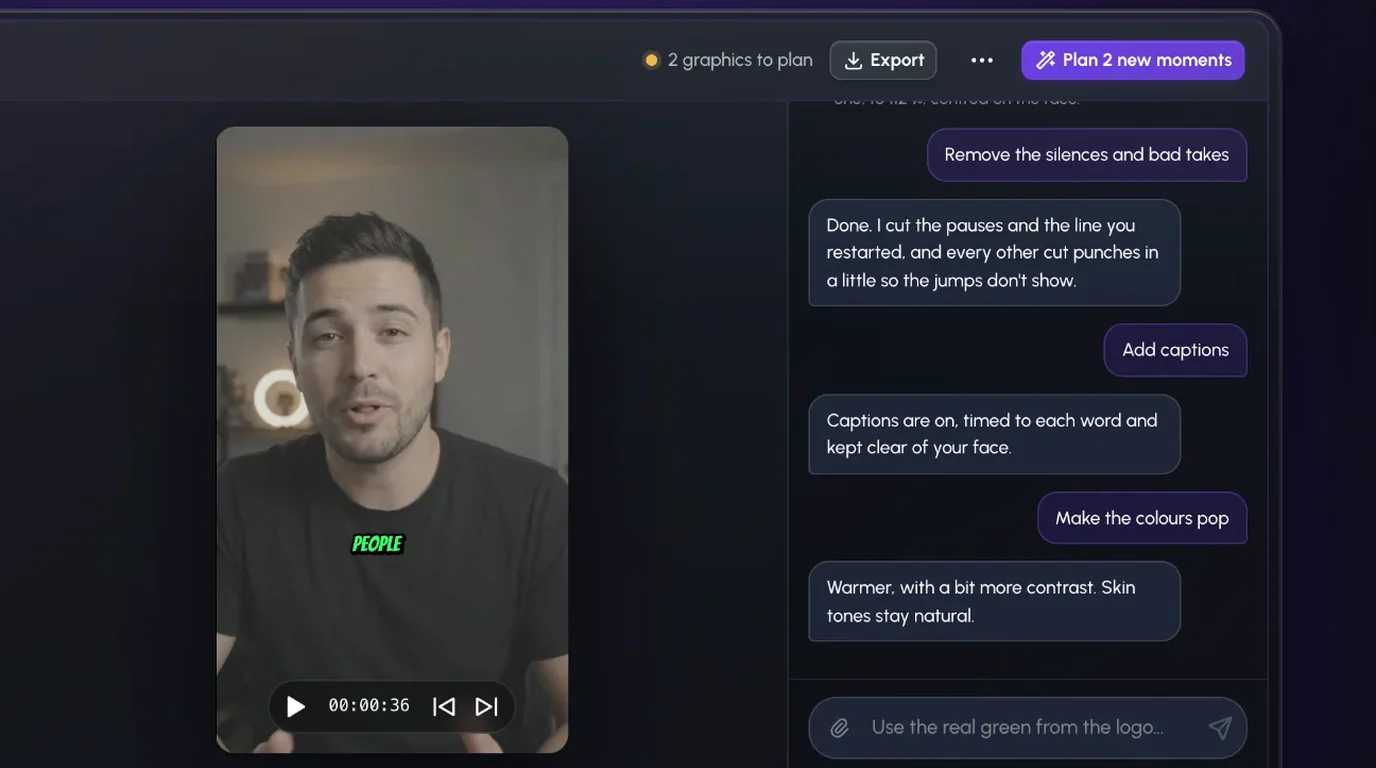
The best AI video editor in 2026 depends on how you want to edit: Rescroll if you'd rather describe the edit in a chat, Descript to edit by transcript, CapCut for quick social clips, Premiere or DaVinci Resolve for a pro timeline, OpusClip to turn long videos into shorts, and Runway to generate or restyle footage.
Rescroll is ours, so weigh that. Prices are from each tool's own pricing page, checked on November 12, 2026.
The short answer
| Tool | How you edit | Best for | Starts at |
|---|---|---|---|
| Rescroll | Describe the edit in a chat | Talking-head videos you don't want to edit by hand | $20/mo billed yearly |
| Descript | Edit the transcript | Podcasts, interviews, long-form | Free; $16/mo billed yearly |
| CapCut | Timeline with AI helpers | Quick Reels and TikToks | Free; Pro price shown at sign-in |
| Adobe Premiere | Pro timeline with AI helpers | People who edit for a living | $22.99/mo (annual plan) |
| DaVinci Resolve | Pro timeline with AI helpers | Pro editing on a budget | Free; Studio $236 |
| OpusClip | Upload a long video, get clips | Podcasts and webinars into shorts | Free; $15/mo |
| Runway | Prompts that make or change footage | B-roll, effects, restyling | Free; $12/mo billed yearly |
Describe the edit: Rescroll
Best for: creators, founders and coaches who film themselves and don't want to learn an editor.
Drop in your raw take and type what it needs: "remove the silences and bad takes, add captions, make the colors pop, punch in on the key lines." Rescroll makes each edit on your own footage, and adds custom motion graphics timed to the word you say. Don't like a cut? Say so and it's redone. This way of working has a name now: vibe editing.
The catch: it runs in Chrome or Edge on a computer, not on your phone. Clips are up to 10 minutes each, and there's no free plan.
Price: Pro is $29/month, or $20/month billed yearly.
Edit the words: Descript
Best for: podcasts, interviews and long videos.
Descript transcribes your recording and you edit it like a doc: delete a sentence and the video goes with it. It clears filler words and long pauses in one pass, and Underlord, its AI co-editor, takes plain-language instructions.
The catch: AI features run on credits, and watermark-free export starts on the Hobbyist plan.
Price: Free plan; Hobbyist is $24/month, or $16/month billed yearly.
A timeline with AI helpers: CapCut, Premiere, DaVinci Resolve
All three are editors first. The AI speeds up single jobs, and you still build the edit yourself.
- CapCut is the fastest route to a captioned Reel or TikTok. Auto Captions and Background Remover are built in, and EditPilot takes a description of what you're making and how it should feel. It's free to download, and CapCut shows your Pro price once you sign in. Side by side: Rescroll vs CapCut.
- Adobe Premiere (Adobe dropped the "Pro" from the name) has Text-Based Editing, captions translated into 20+ languages, and an AI Assistant that sorts footage into bins and assembles rough cuts. It's $22.99/month on an annual plan.
- DaVinci Resolve 21 is our pick for the best free editor. Its AI Neural Engine tools, including text-based editing, Magic Mask and UltraNR noise reduction, are in Studio, which was $236 (marked down from $295) when we checked.
A different job: OpusClip and Runway
Both show up on every "AI video editor" list, but they solve different problems.
- OpusClip takes a long video, picks the highlights and turns them into captioned, reframed shorts. It's a clipping tool: great if you have podcasts or webinars, little use on a 60-second take. The free plan has 60 credits a month, and watermark-free export needs a paid plan. Starter is $15/month and Pro is $29/month. More in Rescroll vs Opus Clip.
- Runway makes and changes footage. Gen-4.5 generates new shots from a prompt, and Aleph 2.0 edits a clip you already have. It's priced by the second of video, so it suits B-roll and effects, not trimming a ten-minute take. Free comes with 125 one-time credits; Standard is $15/month, or $12/month billed yearly.
Film and edit on your phone? Captions is the mobile-first option. We cover it in Opus Clip vs Submagic vs Descript vs Captions.
Which should you pick?
- You'd rather describe the edit than do it: Rescroll.
- You think in words and publish long-form: Descript.
- You post short clips daily and like a timeline: CapCut.
- You edit for a living: Premiere or DaVinci Resolve.
- You have long videos and need shorts: OpusClip.
- You need shots you didn't film: Runway.
Only need graphics on your video? See the best AI motion graphics generators. If dead air is the main problem, here's how to remove silences from a video.
Frequently asked questions
Is there a free AI video editor? DaVinci Resolve is free, though its AI Neural Engine tools are in the paid Studio version. CapCut is free to download, and Descript, OpusClip and Runway have free plans with limits. Rescroll has no free plan.
Can AI edit a video from a text prompt? Yes. Rescroll edits your own footage from what you type in a chat: cuts, captions, color, zooms and motion graphics. Descript's Underlord and CapCut's EditPilot take instructions inside their editors, and Runway's Aleph 2.0 changes a short clip from a prompt.
What's the difference between an AI video editor and an AI video generator? A generator makes new footage from a prompt. An editor works on video you shot. Runway is mostly a generator; the other six here work on your real footage.